

In many ways, Google Analytics 4 (GA4) is a paradigm shift for the beloved and ubiquitous web analytics platform. Its event model is changing entirely, and there are a lot of technical details and jargon surrounding that move. But analytics and marketers want to know one thing:
What does it take to upgrade, and is upgrading worth the effort?
The short answer: Yes, it’s worth making the jump. We’ll walk you through doing that now before we give you the long answer (which is still yes, but with more details).
How Do You Set up GA4?
It’s really simple. Start by doing the following:
- Go to the Admin section in your Google Analytics account.
- Under Property, choose the “GA4 Setup Assistant.”

Next, you’ll want to set up a new GA4 property.
Note: Google recommends that folks keep their existing Universal Analytics (GA3) property running for the next year while the new setup accumulates data.

When you’re done, the assistant will issue you a property name and ID and you can continue the rest of the setup process.

Once you’ve completed the assistant, go into “Data Streams” to start getting data into GA4.

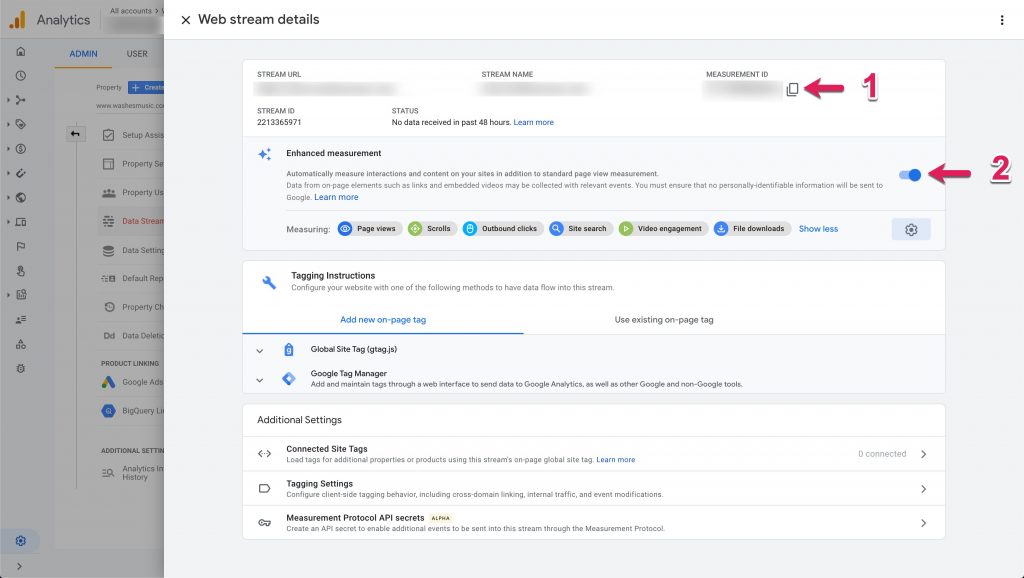
Look up your Web data stream that was created when you established the new GA4 property and do two things:
- Copy your Measurement ID (you’ll need it in Tag Manager later).
- Make sure the Enhanced Measurement toggle is on (this establishes the automated event tracking mentioned later in this post).
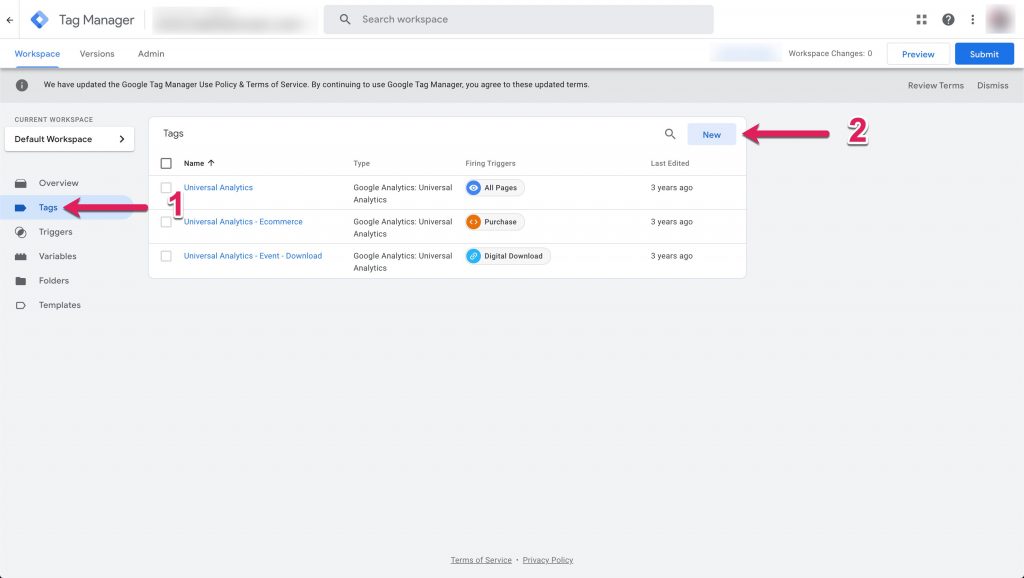
Next, you’ll want to open up your Google Tag Manager container and do this:
- Choose Tags from the left navigation.
- Select New.
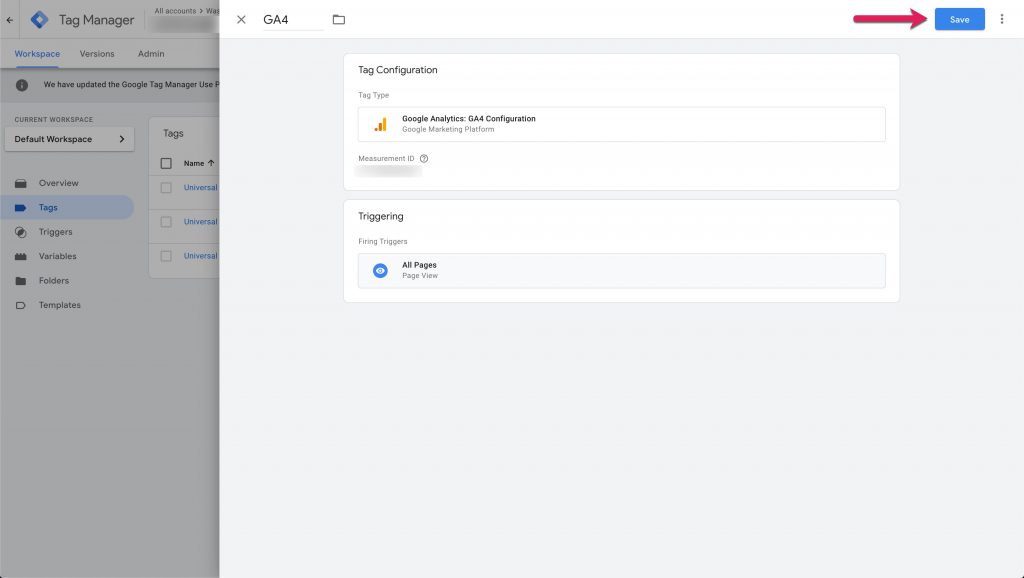
The tag type you’re looking for will be “GA4 Configuration.” Paste in the Measurement ID that you copied earlier in this tutorial and choose the All Pages trigger. Click Save when you’re done.
Then publish the changes in your container and head back to Google Analytics. If you’ve done everything correctly, you should be able to visit the website and see yourself in the Realtime overview report!

Congrats! You now have a working GA4 setup.
So what was our long answer about which GA4 features make this whole exercise worthwhile? We’ll take a look at it now in four respects.
1. Automated Event Tracking
Event Tracking was arguably one of the most attractive features of GA4’s predecessors, but there was always a barrier to entry. Either you had to have a web developer install hard-coded event tracking scripts for you, or you had to know enough about Google Tag Manager to implement triggers.
Now, all you have to do is get the main GA4 data feed set up, and it automatically detects common events like button clicks, downloads, scroll depth, and video plays!
With those things magically handled just by installing GA4 on your site, you’re free to collect the learnings and derive insights immediately.
2. One-Click Goal Creation
Once you’ve got all these beautiful automated events firing in, GA4 makes it deliciously easy to turn them into goals. You go to All events and just toggle Mark as conversion on any important user actions (in this case, file downloads.)

Why create goals? For a few reasons:
- If they’re meaningful user actions, Goals will allow you to calculate the conversion rate of your website.
- Goals facilitate the creation of conversion funnels.
- Goals also unlock special attribution reports in GA, giving you visibility into the multi-touch scenarios that lead to conversion activities.
Need some inspiration? We’ve created a guide to the goals you’ll probably want to track in GA4.
3. Easy Audience Generation
Another can’t-do-without feature in previous iterations of GA was Segments. GA4 handles this functionality a little bit differently, referring to them as Audiences.
Thankfully, they’ve made the process of defining a new Audience very basic (even easier than building Segments, if you ask me):
- Go to Audiences in the left navigation.
- Click the New audience button.

From there, it allows you to select from some pre-configured audience templates or Create a custom audience.

Here you can select any dimension or metric and formulate criteria for your audience, and set a lookback window for audience membership (this comes in handy later when you want to import these audiences into Google Ads).

4. Cheap GA Data Warehousing
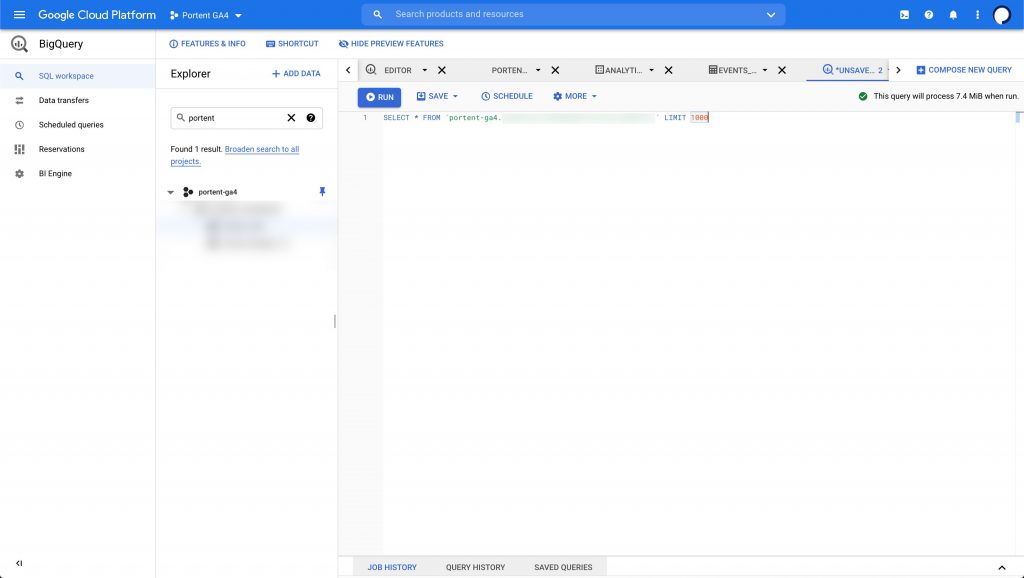
The last major advantage to having GA4 is being able to warehouse your Google Analytics data in a cost-effective way using BigQuery. Previously, this functionality was only available to GA360 subscribers. And at a price tag of $150K/year, it priced out small and mid-sized businesses being able to store their data effectively in a SQL-style environment.
Now, it’s only a couple of clicks away for all organizations with GA4 properties:
- Under property, select BigQuery Linking.
- Then click Link.

Note: This next part requires you to set up a free Sandbox account in BigQuery. New users get $300 free in cloud credits, which should last the average business a long time unless your site gets millions of users per month. Do that before you proceed to the next step.
Establishing the link between GA and BigQuery has you choose a couple steps:
- The location of the server you want to house your data in.
- The frequency of the data transfer (i.e., Daily, Intra-daily, or both).

Once you’re done, data will begin streaming into BigQuery within 24 hours. From there, you can query your data just like a SQL database, giving you incredible analytical flexibility and providing event-level historical data logs regardless of what Google decides to change about GA going forward.
The Evolution We’ve Been Waiting For
Any one of the four features we mentioned is worth the price of admission to GA4, but combine them, and you’ve got something really special for analysts and marketers alike. We’re excited to see where Google takes this version of their flagship analytics tool, and we hope you are too!




This is great!!!